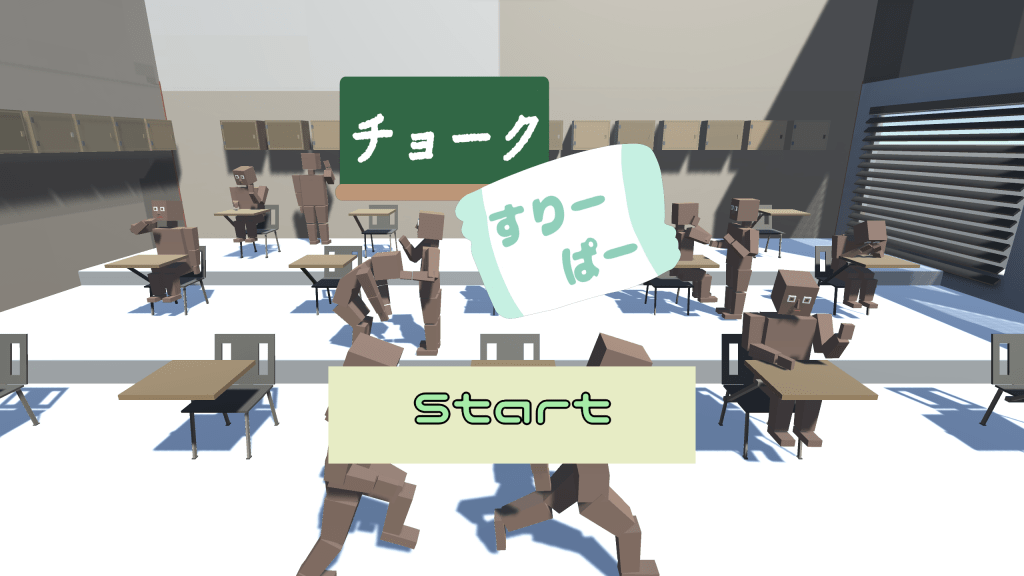
プレイされる方はこちらからダウンロード
概要
- プログラマーとして参加
- 開発人数5人(ゲームデザイナー3人、プログラマー2人)
- 学内で開催されたUnity、コナミ主催のサウンドゲームジャムにて制作、3位を獲得
- 寝ている生徒にチョークを当て起こすことでスコアを加算し、ハイスコアを狙っていくゲーム
開発環境
Unity2022.3.10f1/Visual Studio 2019/C#/Git/Sourcetree
開発期間
2023年10月8日~2023年10月9日
詳細
本作品は、2023年10月に開催された学内のサウンドゲームジャムで制作した作品です。2日間という短い時間の中で音を重視したゲーム作品を制作することがお題でした。Unityでのプログラミング経験者が私1人だけだったのですが、C++を経験された人がいたので、その人にC#のプログラミングを教えることで作業の分担ができました。その際は、C++の機能になぞらえて、C#を教えることで理解しやすい形で教えることができたと思っています。しかし、自身も制作を行いながら人にプログラミングを教えた経験がなかったので、非常に苦労しました。
苦労したことはたくさんありましたが、結果として全体の中で3位となったため良い経験ができたと思っています。
主な担当箇所
チョークを飛ばす
Mathf.Approximatelyを使って、判定処理を行わずにチョークが生徒や床などに当たった時の処理を書くことに挑戦したかったので、チョークを飛ばす前にRayを飛ばし、Rayが当たったオブジェクトのstateやtagで処理を変えるようにしました。また、音に重視するため、起きている生徒にチョークを当てた時に面白いSEがなるよう実装しました。
Script
Shoot.cs
using System.Collections;
using System.Collections.Generic;
using UnityEngine;

public class Shoot : MonoBehaviour
{
    //チョークPrefab
    [SerializeField] GameObject Bullet;
    //カーソル操作
    PointerMove Pm;
    //目標座標
    public Vector3 TargetPosition;
    //チョークの移動速度
    [SerializeField] float ShootSpeed;
    //スコア表示テキスト
    [SerializeField] ScoreText st;
    //クリック時のエフェクト
    [SerializeField] GameObject ClickEffect;
    //SE再生用
    [SerializeField] SEManager se;
    // Start is called before the first frame update
    void Start()
    {
        Pm = GetComponent<PointerMove>();
    }

    // Update is called once per frame
    void Update()
    {
        //左クリックしたときにチョークを飛ばす
        if(Input.GetMouseButtonDown(0))
        {
            //クリックされたx,y座標にz座標を追加し、目標座標を計算
            Vector3 FirstPoint = Camera.main.ScreenToWorldPoint(new Vector3(Input.mousePosition.x, Input.mousePosition.y, 0.0f));
            GameObject B = Instantiate(Bullet, FirstPoint, Quaternion.Euler(90f, 0.0f, 0.0f));
            Vector3 origin = Camera.main.ScreenToWorldPoint(new Vector3(Input.mousePosition.x, Input.mousePosition.y, 100f));
            //Rayを目標座標へ
            Ray ray = new Ray(FirstPoint, origin - FirstPoint);
            RaycastHit hit;
            //Rayがオブジェクトに当たった場合はチョークを飛ばす処理を行う
            if (Physics.Raycast(ray, out hit, Vector3.Distance(FirstPoint, origin)))
            {
                //チョークの目標座標
                TargetPosition = hit.point;
                FirstPoint.z = 0.0f;
                //クリック時エフェクトを呼び出す
                Instantiate(ClickEffect, FirstPoint, Quaternion.identity);

                //チョークにRayに当たったオブジェクトの情報を渡す
                if (hit.collider.gameObject.CompareTag("Player") && hit.collider.GetComponent<StudentStateManager>().currentState == StudentStateManager.StudentState.sleep)
                {
                    B.GetComponent<Bullet>().st = GetComponent<ScoreText>();
                    B.GetComponent<Bullet>().isPlayer_Sleeping = true;
                    B.GetComponent<Bullet>().Student = hit.collider.gameObject;
                }
                else if(hit.collider.gameObject.CompareTag("Player") && hit.collider.GetComponent<StudentStateManager>().currentState != StudentStateManager.StudentState.sleep)
                {
                    B.GetComponent<Bullet>().st = GetComponent<ScoreText>();
                    B.GetComponent<Bullet>().isPlayer = true;
                }
                else if(hit.collider.gameObject.CompareTag("Floor"))
                {
                    B.GetComponent<Bullet>().isFloor = true;
                }
            }
            else
            {
                //Rayが当たらなかった場合は、何もしない
                TargetPosition = origin;
            }
            //チョークに目標座標、移動速度、SEの情報を渡す
            B.GetComponent<Bullet>().TargetPosition = TargetPosition;
            B.GetComponent<Bullet>().RushSpeed = ShootSpeed;
            B.GetComponent<Bullet>().se = se;
        }
    }
}
Bullet.cs
using System.Collections;
using System.Collections.Generic;
using UnityEngine;

public class Shoot : MonoBehaviour
{
    //チョークPrefab
    [SerializeField] GameObject Bullet;
    //カーソル操作
    PointerMove Pm;
    //目標座標
    public Vector3 TargetPosition;
    //チョークの移動速度
    [SerializeField] float ShootSpeed;
    //スコア表示テキスト
    [SerializeField] ScoreText st;
    //クリック時のエフェクト
    [SerializeField] GameObject ClickEffect;
    //SE再生用
    [SerializeField] SEManager se;
    // Start is called before the first frame update
    void Start()
    {
        Pm = GetComponent<PointerMove>();
    }

    // Update is called once per frame
    void Update()
    {
        //左クリックしたときにチョークを飛ばす
        if(Input.GetMouseButtonDown(0))
        {
            //クリックされたx,y座標にz座標を追加し、目標座標を計算
            Vector3 FirstPoint = Camera.main.ScreenToWorldPoint(new Vector3(Input.mousePosition.x, Input.mousePosition.y, 0.0f));
            GameObject B = Instantiate(Bullet, FirstPoint, Quaternion.Euler(90f, 0.0f, 0.0f));
            Vector3 origin = Camera.main.ScreenToWorldPoint(new Vector3(Input.mousePosition.x, Input.mousePosition.y, 100f));
            //Rayを目標座標へ
            Ray ray = new Ray(FirstPoint, origin - FirstPoint);
            RaycastHit hit;
            //Rayがオブジェクトに当たった場合はチョークを飛ばす処理を行う
            if (Physics.Raycast(ray, out hit, Vector3.Distance(FirstPoint, origin)))
            {
                //チョークの目標座標
                TargetPosition = hit.point;
                FirstPoint.z = 0.0f;
                //クリック時エフェクトを呼び出す
                Instantiate(ClickEffect, FirstPoint, Quaternion.identity);

                //チョークにRayに当たったオブジェクトの情報を渡す
                if (hit.collider.gameObject.CompareTag("Player") && hit.collider.GetComponent<StudentStateManager>().currentState == StudentStateManager.StudentState.sleep)
                {
                    B.GetComponent<Bullet>().st = GetComponent<ScoreText>();
                    B.GetComponent<Bullet>().isPlayer_Sleeping = true;
                    B.GetComponent<Bullet>().Student = hit.collider.gameObject;
                }
                else if(hit.collider.gameObject.CompareTag("Player") && hit.collider.GetComponent<StudentStateManager>().currentState != StudentStateManager.StudentState.sleep)
                {
                    B.GetComponent<Bullet>().st = GetComponent<ScoreText>();
                    B.GetComponent<Bullet>().isPlayer = true;
                }
                else if(hit.collider.gameObject.CompareTag("Floor"))
                {
                    B.GetComponent<Bullet>().isFloor = true;
                }
            }
            else
            {
                //Rayが当たらなかった場合は、何もしない
                TargetPosition = origin;
            }
            //チョークに目標座標、移動速度、SEの情報を渡す
            B.GetComponent<Bullet>().TargetPosition = TargetPosition;
            B.GetComponent<Bullet>().RushSpeed = ShootSpeed;
            B.GetComponent<Bullet>().se = se;
        }
    }
}
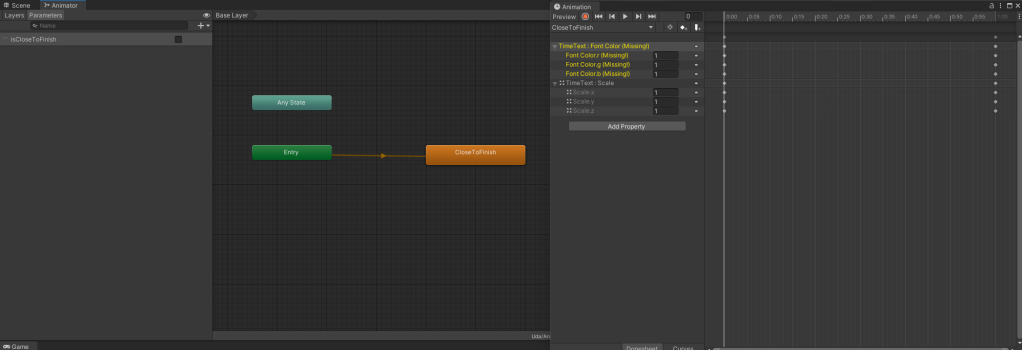
タイマーのアニメーション
プレイヤーに制限時間がわずかになったことを伝えやすくするために、タイマーのテキストが赤くなり、一定間隔で大きくなったり、小さくなるようにしました。こうすることで、プレイヤーを焦らせることができたと思っています。
Script
TimeAnimation.cs
using System.Collections;
using System.Collections.Generic;
using UnityEngine;

public class TimeAnimation : MonoBehaviour
{
    private Animator m_Animator;
    [SerializeField] Countdown cd;
    // Start is called before the first frame update
    void Start()
    {
        m_Animator = GetComponent<Animator>();
        m_Animator.enabled = false;
    }

    // Update is called once per frame
    void Update()
    {
        //残り11秒以下でアニメーション開始
        if(cd.MaxCount <= 11f && cd.MaxCount > 0f)
        {
            m_Animator.enabled = true;
            m_Animator.SetBool("isCloseToFinish", true);
        }

        //制限時間終了時アニメーション終了
        if (cd.MaxCount <= 0)
        {
            m_Animator.enabled = false;
        }
    }
}
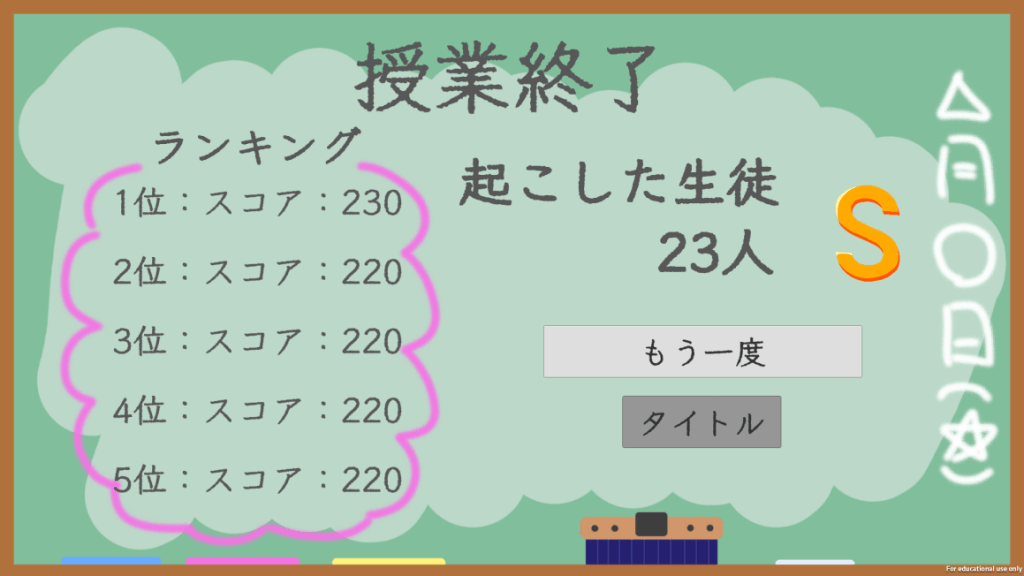
スコア表示
プレイヤーにスコアで競ってもらいたかったので、元の仕様にはありませんでしたが、モバイルバックエンドを利用して、全国ランキングを疑似的に実装しました。そして、友人にデータを配布したところ想定以上のスコアが出てしまったためS、A、Bの評価にSSを追加しました。
(※モバイルバックエンドサービス終了のため、現在はランキングが表示されません。)
Script
ScoreRanking.cs
using System.Collections;
using System.Collections.Generic;
using UnityEngine;
using NCMB;
using System.Linq;
using UnityEngine.UI;

public class ScoreRanking : MonoBehaviour
{
    //ランキング表示用テキスト
    [SerializeField] Text RankingText;
    //今回のスコア
    int CurrentScore;
    //PlayerPrefs用のKey用
    string key = "CurrentScore";

    int StateCount;
    //評価のimage
    [SerializeField] Image RankImage;
    public List<Sprite> ImageList;

    /*
    0 = B,
    1 = A,
    2 = S
    */

    // Start is called before the first frame update
    void Start()
    {
        StateCount = 1;
        //今回のスコア取得
        CurrentScore = PlayerPrefs.GetInt(key, 0);

        //スコアに応じて、評価のimage変更
        if(CurrentScore < 50)
        {
            RankImage.sprite = ImageList[0];
        }
        else if(CurrentScore > 50 && CurrentScore < 100)
        {
            RankImage.sprite = ImageList[1];
        }
        else
        {
            RankImage.sprite = ImageList[2];
        }
    }

    private void Update()
    {
         /*
         0:授業評価表示
         1:スコア表示
         */
        switch(StateCount)
        {
            case 0:
            CurrentScore = PlayerPrefs.GetInt(key, 0);
            RankingText.text = "授業評価:" + CurrentScore.ToString();
                break;
            case 1:
                //順位のカウント
                int count = 0;
                string tempScore = "";
                //データストアの「data」クラスから検索
                NCMBQuery<NCMBObject> query = new NCMBQuery<NCMBObject>("data");
                //Scoreフィールドの降順でデータを取得
                query.OrderByDescending("score");
                //検索件数を5件に設定
                query.Limit = 5;
                query.FindAsync((List<NCMBObject> objList, NCMBException e) => {
                    if (e != null)
                    {
                        UnityEngine.Debug.Log("ランキング取得失敗");
                    }
                    else
                    {
                        //検索成功時の処理
                        UnityEngine.Debug.Log("ランキング取得成功");
                        // 値とインデックスのペアをループ処理
                        foreach (NCMBObject obj in objList)
                        {
                            count++;
                            //スコアを画面表示
                            tempScore += count.ToString() + "位:" + "スコア:" + obj["score"] + "\r\n";
                        }
                        RankingText.GetComponent<Text>().text = tempScore;
                    }
                });
                break;
        }

    }

}
 宇田裕貴のポートフォリオ
コメントを残す